
Class Hub – Tasks and Challenges: set Year 6 maths targets and prizes for your whole class
Give your class a goal. Set the tasks, set the target, choose the prize.
Class Tasks and Challenges is the teacher hub on MathsForSATs for directing Year 6 maths practice. Set quests that send pupils to the exact worksheet, test or reasoning challenge you want, and launch a class challenge with a shared target and a reward for reaching it.
Pupils see everything in one place and get a notification when something is waiting, so the whole class knows what to do next.
Already a member? Log in and this page becomes your class hub.
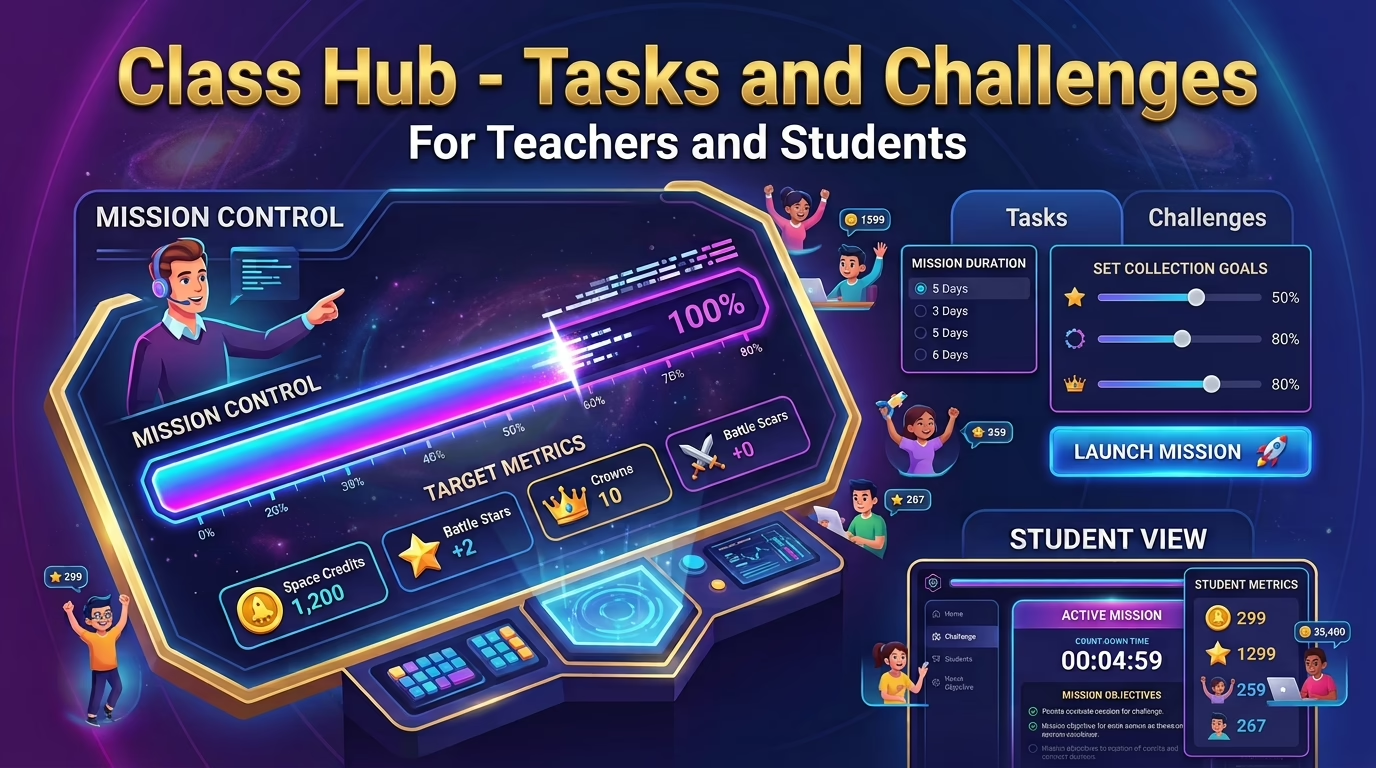
How it works
- Set up your classCreate your class so your pupils are linked to it and can see what you set.
- Set a questCopy the link to any worksheet, assessment, test or reasoning challenge, add a title and choose how long it stays up.
- Launch a class challengePick the goals, choose how many days the mission lasts and write the prize your class is working towards.
- Pupils get notifiedQuests appear on each pupil's dashboard, and a notification tells them when a challenge or quest is waiting.
- Watch the progress riseThe progress bar fills as pupils earn points. When the class reaches 100%, the prize is unlocked.
Why teachers use it
One hub for class activities
Direct pupils to any worksheet, assessment, test or reasoning challenge on the platform by pasting its link. There are no separate handouts or lists to manage.
A goal the whole class shares
Pupils work together towards one target. Only points earned after the challenge launches count, so everyone starts from a clean slate.
Pupils always know what is next
Quests appear on each pupil's dashboard and show as visited once opened. The Activities page also shows a notification when something is waiting.
Live progress
The progress bar updates automatically, with a breakdown for each type of point, so the class can watch the target getting closer.
What you can set up
Class Tasks (Quests)
Paste a link, add a title and choose how long it stays up: 24 hours, or 2, 3 or 5 days. Expired tasks clear themselves, and you can delete one at any time.
Class Challenges
Choose one or more goals, a duration from 1 to 14 days and a prize. Everyone's points count towards the class total.
Pupil notifications
A bell notification tells pupils how many challenges and quests are waiting, with a button straight to their class page.
Targets, prizes and celebration
Class challenge goals can be set in Space Credits, Marks, Battle Stars, Battle Scars, Booms and Crowns, on their own or in combination. Built-in guidance suggests balanced targets for a typical Year 6 week, so the challenge is ambitious but achievable.
You choose the prize, such as extra break time or a stretch of golden time on Friday afternoon. When the class completes its mission, a celebration screen unlocks the reward. If time runs out first, pupils get an encouraging debrief that recognises the effort they put in, and you can launch a fresh challenge straight away.
Questions about Class Tasks and Challenges
What are Class Tasks and Class Challenges?
Class Tasks (shown to pupils as Quests) send your class to a specific activity on MathsForSATs. Class Challenges give the whole class a shared points target and a prize of your choice for reaching it.
How do I set a class task?
Open the worksheet, assessment, test or reasoning challenge you want, copy its web address, and paste it into the task form with a title. Then choose how long the task stays up: 24 hours, or 2, 3 or 5 days.
What happens when a task expires?
Expired tasks are removed from your list and from your pupils' dashboards automatically. You can also delete a task yourself at any time.
How does a class challenge work?
You choose one or more point goals, how many days the mission lasts (from 1 to 14) and a prize. Points your pupils earn after the launch count towards the target, and progress is shown on a live bar.
Can I change or end a challenge?
Yes. You can cancel a running challenge, and once a challenge is completed or has expired, you can set a new one straight away.
What do pupils see?
Pupils see the class challenge and its progress, plus a list of your Quests, each marked as visited once they open it. A notification bar on the Activitie page tells them when something is waiting.
What prize should I choose?
It’s entirely up to you. Many teachers choose something simple and free, such as extra break time or Golden Time. The real motivation comes from the challenge itself and working together towards a common goal. The reward is simply a way to celebrate the class’s achievement and recognise their collective effort.
How do I get started?
Register for a MathsForSATs membership, set up your class and log in. This page then becomes your class hub, where you can set tasks and launch challenges.
Ready to set your first class goal?
Register, set up your class and launch your first challenge today.